Expand description
§RavenRS
Beautiful native interfaces, powered by Rust.
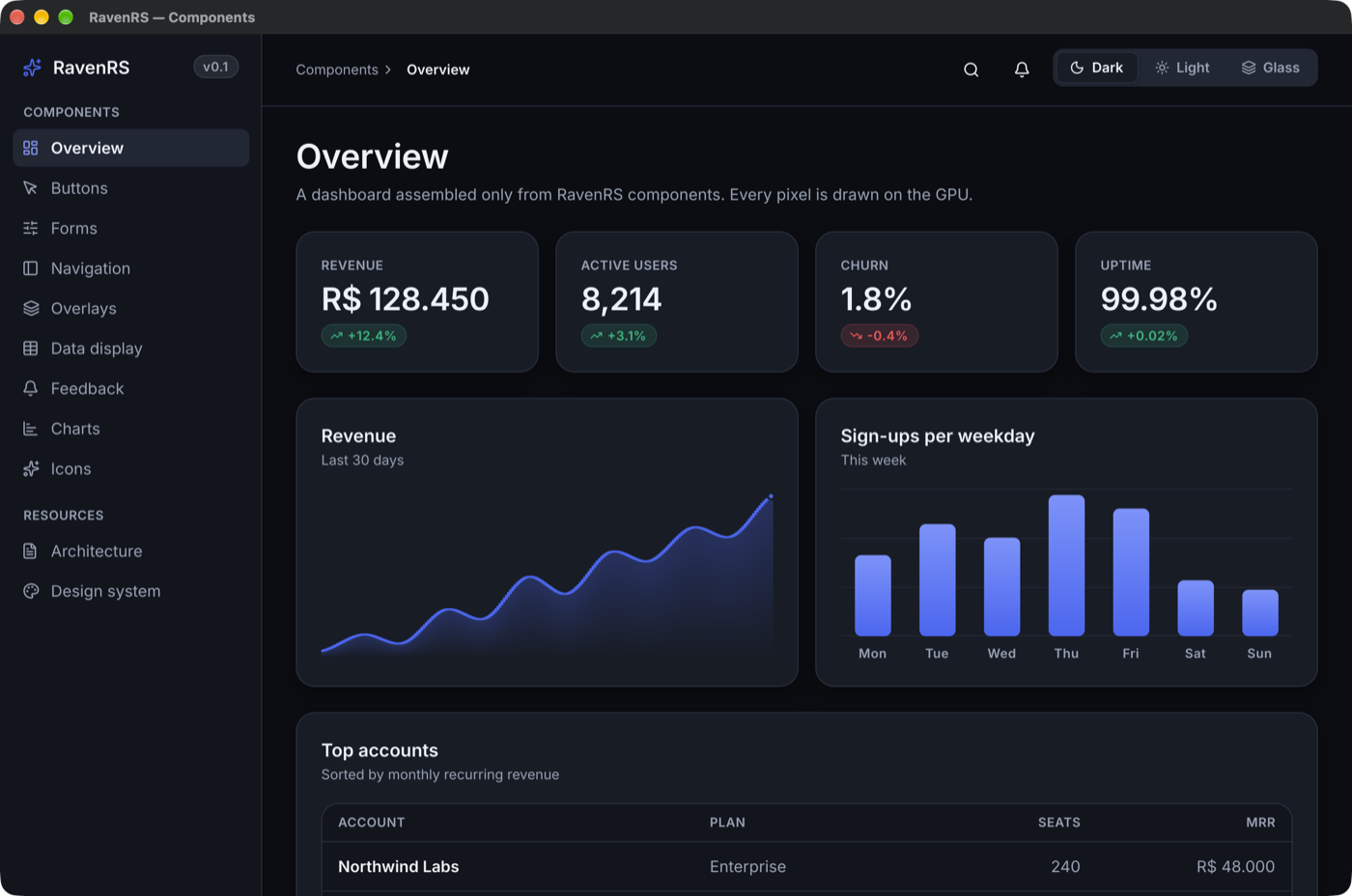
The whole toolkit for serious applications, free and open source: 100+ components, a data grid for 100,000+ rows, a reporting suite with a server, ravenrs-app, which turns a Rust struct into a working application, training films that ship inside your app, and AI that stays on the machine. One codebase, drawn on the GPU, on Windows, macOS, Linux and the web.
Try the live gallery · Playground · Report designer · Install a real app · An app from two structs · Getting started · Components · API docs



§What you get
Building a business application usually means assembling a UI kit, a commercial grid, a reporting product and a stack of custom screens. RavenRS is all of it, in one language, under one license.
ravenrs-app | Declare a Rust struct and get the application: navigation, lists, forms, rules, security and an audit trail | Generated app |
| Raven Finanças | A complete family finance app, built with all of this, to install on your computer | Install |
| Components | 100+ designed, tested components: ribbon, scheduler, command palette, charts, forms, wizards, 200 icons | Gallery |
| DataGrid | 100,000+ rows at 2 ms a frame, grouping, summaries, editing, master-detail, Excel and PDF | Gallery |
| Reporting | Engine, end-user designer, viewer, PDF and XLSX, and a server that emails reports on a schedule | Designer |
| Training films | Vector films of your real app that weigh kilobytes, re-recorded by a script when screens change | ravenrs-movie |
| Local AI | Models that run on the CPU in plain Rust, with nothing sent anywhere | ravenrs-ai |
§ravenrs-app: declare a record, get the application
The newest and biggest part of RavenRS. The screens most business software spends its budget on come from a Rust struct, and you write only what makes your application different:
use ravenrs_app::BusinessObject;
use ravenrs_app_ui::App;

#[derive(BusinessObject)]
#[object(caption = "Accounts", navigation = "Records", icon = "wallet")]
#[rule(criteria = "[opening] >= 0", message = "An account cannot open negative")]
struct Account {
    #[field(key)]
    id: i64,
    #[field(caption = "Name", default_property, required)]
    name: String,
    #[field(caption = "Opening balance", money)]
    opening: i64,
}

fn main() -> Result<(), ravenrs::native::PlatformError> {
    let window = App::new("Accounts").entity::<Account>().into_view();
    ravenrs::native::run(window, ravenrs::native::WindowOptions::new("Accounts"))
}
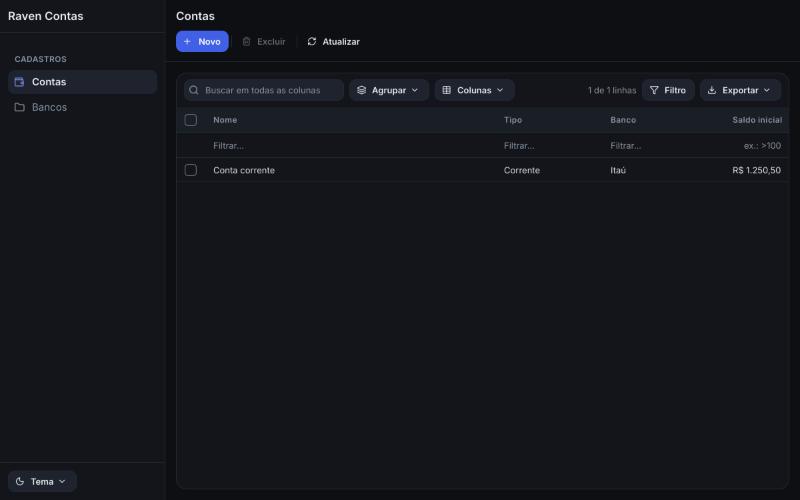
That is the whole application: navigation, a list with search, filters and export to Excel, PDF and CSV, a form, and every command from New to Save and close. A wrong attribute is a compile error that points at it. See one running in your browser, generated from two structs:
From there it grows with you:
- Rules and logic: validation of every kind, warnings that let people go on, conditional appearance, state machines, reminders, actions and controllers.
- Security: sign-in with lockout, roles and permissions on entities, records, fields, navigation and actions, enforced in the data layer even with no screen, and a full audit trail.
- Data: SQLite on a schema it manages or on tables you already have, migrations, relations, attachments, and concurrent changes that merge.
- Views: dashboards, charts, trees, calendars and timelines over a list, and reports your users design and keep as records.
- Customization at run time: a model in layers, so a module, an administrator or a user can change the application as a JSON difference, and even add fields.
Status: usable today, with the API still moving, and shipped as separate crates: cargo add ravenrs ravenrs-app ravenrs-app-ui. See docs/APP-FRAMEWORK.md, and run cargo run -p feature-center for a demonstration of every feature.
§Install a real app
Want to see what all of this adds up to? Raven Finanças is a complete desktop app for a family’s expenses and bills to pay, built with RavenRS and free to install on your own computer. Its interface is in Brazilian Portuguese, and it opens on a sample family, so there is something to explore right away.
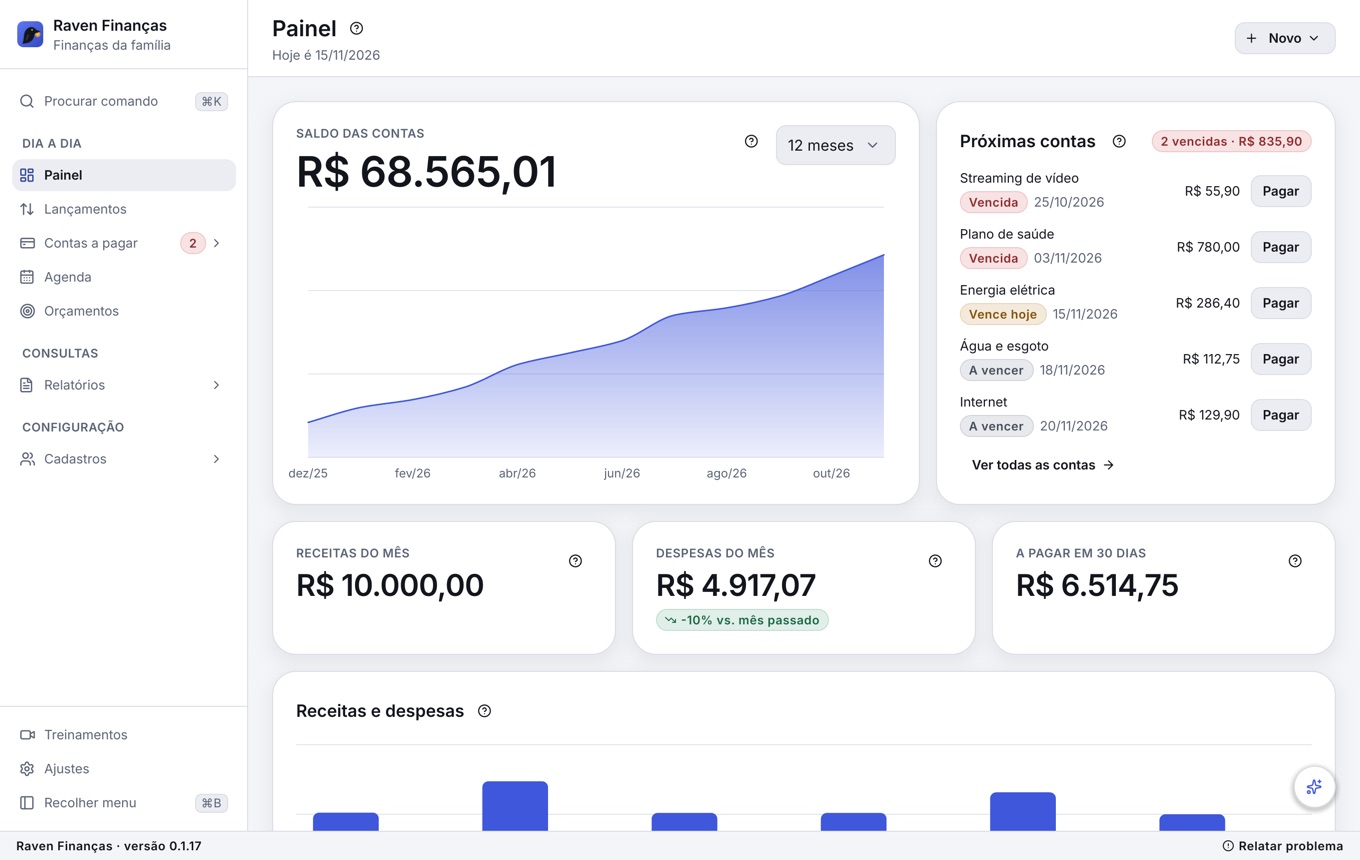
- Your data stays with you, in one SQLite file on your computer, with backups and reports you can export.
- A real workout for the framework: dashboard,
DataGrid, scheduler, budgets, reports, command palette and generated forms in everyday use. - Six training films inside the app, about 16 minutes in all at about 700 KB, and a question opens the moment that answers it.
- An optional local AI assistant that answers about your money and prepares entries, with nothing leaving the machine.
The installer compiles the app on your machine and gets what it needs first, Rust and a C compiler, so the first run can take a while. It asks for an administrator’s permission only to install those tools, and the app then keeps itself up to date.
On macOS and Linux, in a terminal:
curl -fsSL https://raw.githubusercontent.com/alexkads/RavenRS/master/examples/family-finance/install.cmd -o /tmp/install.cmd && sh /tmp/install.cmdOn Windows 11, in PowerShell:
irm https://raw.githubusercontent.com/alexkads/RavenRS/master/examples/family-finance/install.cmd -OutFile "$env:TEMP\install.cmd"; & "$env:TEMP\install.cmd"Already have the repository? cargo run -p family-finance runs it without installing. The app’s README shows which component each screen uses.
§Why RavenRS
- One UI, every platform. Desktop windows and a browser
<canvas>share the renderer, the layout engine and every component. No webview, no DOM widgets, and the same pixels everywhere. - Fast, and quiet when idle. A form with 40 cards takes 1.6 ms a frame, against a 16.7 ms budget at 60 Hz.
State<T>knows who reads it, so a change redraws only what depends on it, and an idle app uses no CPU or GPU. - Finished by default. Three themes (Raven Dark, Raven Light, Raven Glass) built from semantic design tokens, with text contrast checked against WCAG AA in the test suite.
ThemeEditorchanges any token live and copies the result as JSON. - Accessible. Keyboard operation follows the WAI-ARIA patterns, and screen readers get a real tree: AccessKit on the desktop, an ARIA mirror on the web. The gallery’s test suite fails on any unnamed control.
- Built to be extended. Your components use the same public API as the built-in ones, from a simple
Componentto a fully customViewthat draws, scrolls, opens overlays and handles input. - Ready for coding assistants. A skill and an offline MCP server let them write against the real API instead of guessing it.
§Quick start
Add RavenRS from crates.io:
cargo add ravenrsWrite your UI:
use ravenrs::prelude::*;

fn app() -> impl View {
    let count = State::new(0);
    let increment = count.clone();

    VStack::new((
        Text::new("Welcome to RavenRS").style(TextStyle::Display),
        Card::new(VStack::new((
            Text::new("REVENUE").style(TextStyle::Caption).foreground(Semantic::InkMuted),
            Text::new("R$ 128.450").style(TextStyle::Metric),
            Text::bound(&count, |n| format!("Clicked {n} times")).foreground(Semantic::InkMuted),
        ))),
        Button::new("Get Started").icon(IconName::Sparkles).on_click(move || increment.update(|n| *n += 1)),
    ))
    .spacing(24.0)
    .padding(32.0)
}

fn main() -> Result<(), ravenrs::native::PlatformError> {
    ravenrs::native::run(app(), ravenrs::native::WindowOptions::new("Hello"))
}
The getting started guide covers the browser build, state, components of your own, themes and the data grid.
§A data grid for real data
DataGrid draws a frame over 100,000 rows in 2 ms. Measured on an Apple M-series laptop, every operation people wait for stays inside one 60 Hz frame:
| Over 100,000 rows | Measured |
|---|---|
| Filter by a range | 0.9 ms |
| Search across columns | 3.2 ms |
| Sort by a number | 7.9 ms |
| Filter by an expression over three conditions | 8.6 ms |
| Group with summaries | 11.3 ms |
- Find: multi-column sort, filter row with operators and expressions such as
[Seats] > 10 And [Country] = 'Brazil', checklists of values, a visual filter builder, search across columns. - Organize: nested grouping by dragging headers, group and footer summaries with formulas, columns that reorder, resize and pin, master-detail rows, saved layouts and named scenarios.
- Edit: typed cell editing with edits that can be refused, adding and deleting rows, buttons on rows, any view as a cell template.
- Scale and ship: rows from a server with bounded memory, paging or infinite scroll, and export to Excel, PDF and CSV with real numbers and dates.
§Reporting, from designer to inbox
A complete reporting suite in Rust, on the desktop, in the browser and on servers. Open the designer in your browser and build a report without installing anything.
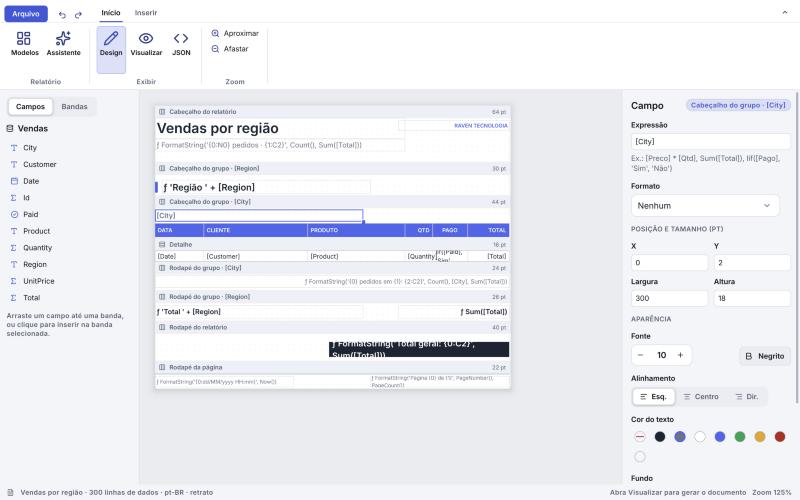
- Engine: banded reports with nested groups, master-detail, summaries, expressions, parameters, conditional formatting, charts, barcodes and watermarks. A report is a JSON document, so it can live in git or a database, and be written by code. A grouped report of 10,000 rows and 305 pages lays out in 80 ms.
- Designer: a wizard, a ribbon, drag and drop, a field list, a live preview and undo, ready to embed in your own app for your users.
- Viewer: page navigation, zoom, thumbnails, text search and a parameter panel.
- Export: vector PDF with embedded font subsets and selectable text, XLSX with real numbers and dates, CSV and SVG, all in pure Rust.
- Server:
ravenrs-report-serverstores layouts with versions, renders over HTTP, and delivers scheduled reports by email or to a folder, with cron schedules, time zones, retries and a history of every run.
See docs/REPORTING.md. The expressions come from ravenrs-criteria, one language that filters a grid, totals a report, guards a rule or becomes a parameterized SQL WHERE.
§Training that ships inside your app
ravenrs::movie makes a film of your app with no pixels in it. It stores what the app drew, so it stays sharp at any zoom, and a minute costs kilobytes instead of megabytes.
- Recorded by a script. It runs the real app, needs no GPU, and clicks by the names screen readers see. When the screens change, run it again.
- Edited on a timeline. Cuts, speed, callouts, captions, spotlight and zoom in
MovieEditor, all non-destructive. - Interactive.
MoviePlayerhas chapters and steps that wait for the viewer’s click, with sounds and voice computed at play time. - Answers questions.
MovieAssistantandMovieChatopen the film at the moment that answers what someone asked. - Reports bugs that show what happened.
FlightRecorderandBugReporterkeep the recent past of the app the same way.
§AI that stays on the machine
ravenrs-ai runs models on the CPU with plain Rust, so building your app still needs nothing but Cargo, and what people ask never leaves their computer.
- Offers only what fits.
ModelManagerchecks memory and disk, then downloads with progress and verified hashes. The catalog has LFM3, Gemma 3, Qwen, Llama 3.2, Phi-3 and Mistral, from 0.4 to 5 GB. - Takes actions safely. A model can choose among your app’s tools, but your code reads the data and does the work, so it never makes up a number.
- Speaks. A local voice model gives assistants a voice and narrates training films.
Chat, ModelPicker and FloatingPanel put it on screen. Local models run on the desktop, not in the browser.
§Components
| Group | Components |
|---|---|
| Buttons and commands | Button (4 styles, 3 sizes, icons, loading, selected), IconButton, ToggleButton, ToggleGroup, ButtonGroup, SplitButton, SegmentedControl, Toolbar, FloatingToolbar, ThemePicker, ThemeEditor, ThemeSwitcher |
| Text and choices | TextField, TextArea, CodeEditor, Playground, NumberField, MaskedField, InputOtp, Select, Combobox, LookupField, TagBox, Checkbox, RadioGroup, Toggle, Slider, ValueSlider, InlineRename, Stepper, Rating, FavoriteToggle, ColorPicker, ColorSwatch, SwatchGrid, ColorPair, NinePointAnchor, FileUpload, DropZone, ImageField |
| Forms | FormField with validate::{required, email, min_length} and custom rules, FormLayout, FilterBuilder, Wizard, StepIndicator, StepBadge, Label, HelpTip |
| Dates and scheduling | Calendar, DatePicker, DateRangePicker, TimePicker, DateTimePicker, YearView, EventCalendar, Scheduler (a timeline per resource), RecurrenceEditor, Timeline |
| Navigation | Ribbon, Menubar, Tabs, DocumentTabs, Sidebar, SidebarBrand, Breadcrumb, Pagination, Disclosure, Collapse, Accordion, CommandPalette (⌘K) |
| Overlays | Dialog, ConfirmDialog, Sheet, FloatingPanel, SplashScreen, Popover, HoverCard, Tooltip, DropdownMenu, ContextMenu, Toaster |
| Data | DataGrid, TreeView, CardView, Table, List, VirtualList, SortableList, FileBrowser, Stat, Barcode (QR Code and linear codes) |
| Charts | Chart (line, area, bar, pie, doughnut, radar, radial, scatter, sparkline, candlestick), ChartCard, ChartReference, SankeyChart, BarChart, AreaChart: all 70 patterns of the shadcn/ui chart catalog are in the gallery |
| Layout | TileLayout, VStack, HStack, Grid, ScrollView, Sticky, ScrollScene, ScrollLinked, Anchor, Ticker, Link, QuadField, ScrollEdgeArrow, Splitter, SplitPanes, SplitHandle, DockArea, Card, GlassCard, Section, AspectRatio, ZStack, PropertyRow, PageHeader, Spacer, Footer, StatusBar, TitleBar, ToolRail, responsive, and .padding(), .background(), .frame(), .grow() on any view |
| Media and feedback | Image (PNG/JPEG), Icon (200 Lucide icons), Filmstrip, PagedDocumentView, ImageLightbox, CompareView, Eyedropper, CropOverlay, Protractor, TransformHandles, Marquee, RubberBand, RuleOfThirdsGrid, Minimap, ZoomPanView, ZoomControl, CurveEditor, ColorWheel, Ruler, Histogram, Carousel, Avatar, Badge, Dot, OverlayBadge, IconTile, EmptyState, Alert, HeroBanner, ProgressBar, MultiProgress, ShimmerText, Spinner, Skeleton, Kbd, ShortcutSheet, ShortcutHintBar, Divider, DaySeparator, Canvas, CodeBlock, ReleaseNotes, Lottie |
| Assistants | Chat, RichText, AttachmentStrip, AudioPlayerButton, SelectionBar, ModelPicker |
Training and support (ravenrs::movie) | Recorder, MoviePlayer, MovieAssistant, MovieChat, MovieEditor, FlightRecorder, BugReporter |
Every component is in examples/component-gallery, which runs natively and in your browser. For a whole app, install Raven Finanças.
§Your own components
use ravenrs::prelude::*;

/// State lives in the struct; `body` composes views and runs on every rebuild.
struct Counter {
    count: State<i32>,
}

impl Component for Counter {
    fn body(&self) -> impl View {
        let count = self.count.clone();
        HStack::new((
            Text::bound(&self.count, |c| format!("{c}")).style(TextStyle::Title),
            Button::new("+1").on_click(move || count.update(|c| *c += 1)),
        ))
    }
}
Need full control? Implement View and use BuildCx: layout boxes, any drawing through Paint::Custom, per-instance state with cx.use_state, floating layers with cx.overlay, virtualized scrolling, timers with cx.wake_at, and input through on_click, on_key, on_drag, on_context_menu and shortcut. Every built-in component is written this way.
§Getting started
npx create-ravenrs minha-lojaThe guided setup prepares Rust and the matching CLI, then creates an app with the RavenRS
MCP server, skill and instructions for coding assistants. Choose hello, app, app-sqlite
or relatorios, and desktop, web or both. Use --yes for noninteractive setup. Existing
installations are reused and system packages are reported with manual instructions.
See create-ravenrs.
If Rust is already installed:
cargo install --git https://github.com/alexkads/RavenRS --locked cargo-ravenrs
cargo ravenrs new minha-loja
Use --tag vYY.R.P when installing to match a particular release.
See the CLI guide.
§Run the examples
Requirements: Rust stable 1.88+. For the browser: the wasm32-unknown-unknown target and wasm-bindgen-cli 0.2.130 (it must match the crate version).
cargo run -p component-gallery --releaserustup target add wasm32-unknown-unknowncargo install wasm-bindgen-cli --version 0.2.130 --locked./scripts/build-web.sh component-gallery && python3 -m http.server -d examples/component-gallery/web 8080Then open http://localhost:8080 in a current browser. RavenRS draws with WebGPU where the browser has it and with WebGL2 otherwise, so it also opens on phones and browsers without WebGPU; WebOptions::backend can ask for one of them.
§Quality you can check
- More than 1,400 tests, including accessibility audits, property tests, and GPU golden images in dark and light.
- Performance budgets with published numbers, kept by benchmarks: see docs/QUALITY.md.
- Small enough for the web: a hello-world is about 1.2 MB gzipped, and the whole gallery with every chart about 1.5 MB.
- Almost no
unsafe: one call in the workspace, for touchpad pinches on Wayland. - An open scorecard: docs/PARITY.md tracks 113 component families of shadcn/ui and two commercial component suites: 72 done, 7 partial and 34 planned, with what is missing named row by row. docs/REPORTING-PARITY.md and docs/APP-PARITY.md do the same for reporting and the application framework.
Versions follow the component-vendor model, YY.R.P, with new features in .2 and monthly fixes. Until 28.1.0 any release may hold breaking changes, so pin an exact version if that matters to you; from then on they come only in each year’s .1 (docs/VERSIONING.md).
§AI assistants
RavenRS ships a skill and an MCP server so coding assistants write against the real API instead of guessing it.
- The skill teaches how to compose screens, use tokens instead of literal values, meet the quality bar and build for the web.
- The MCP server (
ravenrs-mcp) is read-only and works offline. It lists components, shows their API and real examples, looks up design tokens, reports parity status and validates expressions.
cargo ravenrs new registers cargo ravenrs mcp for Claude Code, VS Code / Copilot,
Cursor and Codex, copies the version-matched skill, and writes project instructions.
For an existing app, run cargo ravenrs ai, then cargo ravenrs doctor to verify it.
Use --plugin to select the versioned Claude marketplace plugin instead of the local skill.
Whoever writes the code, a person or any agent, ravenrs-lint holds it to the same rules: it denies literal colors and sizes, spacing off the grid, unnamed icon buttons and state or blocking work in body, and cargo ravenrs-lint --init turns rustc and Clippy to their strictest and writes the rules into AGENTS.md, CLAUDE.md, GEMINI.md and Copilot’s instructions.
cargo install ravenrs-lint --locked && cargo ravenrs-lint --init§Crates
Start with ravenrs. The others come in as you need them.
| Crate | What it does |
|---|---|
ravenrs | The facade and prelude, with components, windows, the web and films. Start here. |
ravenrs-report, -viewer, -designer | The report engine, the document viewer and the designer. |
ravenrs-report-export, -pdf, -xlsx | Reports as files. |
ravenrs-report-server | Layouts, rendering over HTTP and scheduled delivery. |
ravenrs-spreadsheet, ravenrs-sheet | A spreadsheet component and its engine: formulas, recalculation, .xlsx in and out. |
ravenrs-grid-export | What a DataGrid shows, as Excel, PDF or CSV. |
ravenrs-app, -derive, -ui | The application framework: model, attributes and generated screens. |
ravenrs-app-i18n | Languages and words of the screens and components, by key, with English to fall back on. |
ravenrs-app-sqlite, -report, -library | Storage, reports inside an application, and ready-made records. |
ravenrs-ai | Local models and voice. |
ravenrs-movie | Vector training films and bug reports. |
ravenrs-criteria | The expression language, independent of any UI. |
ravenrs-graphics | Vector shapes, chart layout and barcodes, shared by every engine. |
ravenrs-lottie | A Lottie player of our own: reads the file and works out each frame’s curves. |
ravenrs-widgets | Every component, the View/Component/BuildCx API and the Ui runtime. |
ravenrs-reactive | State, Binding, Derived and dependency-tracking observers. |
ravenrs-animation | Springs, easing and transitions. |
ravenrs-style | Design tokens and the Raven Dark, Light and Glass themes. |
ravenrs-layout | Flexbox and grid layout on Taffy. |
ravenrs-text | Text with Parley; Inter and the icon font embedded. |
ravenrs-render | The wgpu renderer: SDF shapes, shadows, gradients, images, glyph atlas, clipping. |
ravenrs-core | Geometry, colors, input events and the Scene display list. |
ravenrs-platform-native | Desktop windows with winit. |
ravenrs-platform-web | <canvas> + WebGPU or WebGL2 in the browser. |
ravenrs-wayland-gestures | Touchpad pinches on Wayland. |
ravenrs-mcp | A read-only MCP server for coding assistants. A tool, not a dependency of your app. |
ravenrs-lint | Lints for applications: theme tokens, the 4px grid, named controls, no state or blocking work in body. A dev-dependency and cargo ravenrs-lint. |
§Roadmap
RavenRS moves fast, and these are the known gaps.
- Components: pivot grid, floating windows, rich text and spreadsheet editors.
- DataGrid: multi-level headers, columns pinned to the right, row drag and drop, cell range copy.
- Reporting: subreports, a table of contents, cross tabs, and DOCX, HTML and PNG export.
- Application framework: a web API, other databases, multi-tenancy, a command-line tool for new projects.
- Platform: IME composition display on the desktop, right-to-left layout, multiple windows, backdrop blur for Raven Glass.
- Motion: rotation and true group opacity, which need transforms and layers in the renderer.
See docs/PARITY.md for the full list and CHANGELOG.md for what changed.
§Contributing
Issues, ideas and pull requests are welcome. CONTRIBUTING.md explains how to build, test and add a component. Please follow the code of conduct.
§License
Licensed under either of Apache License 2.0 or MIT, at your option. The embedded Inter font is under the SIL Open Font License 1.1; the icons come from Lucide under the ISC License.
Unless you state otherwise, any contribution you submit is dual-licensed as above, without additional terms.
§Crates behind this facade
core, animation, reactive, layout, text, style, render and widgets
can also be used on their own.
Re-exports§
pub use ravenrs_animation as animation;pub use ravenrs_core as core;pub use ravenrs_layout as layout;pub use ravenrs_live as live;pub use ravenrs_movie as movie;pub use ravenrs_reactive as reactive;pub use ravenrs_render as render;pub use ravenrs_style as style;pub use ravenrs_text as text;pub use ravenrs_widgets as widgets;